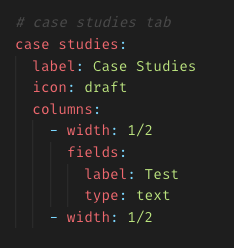
I’m attempting to build out a four-tab admin layout. I was able to put some columns and fields in the first “tab” and a gallery in the fourth, but any time I try to add fields to the other tabs they either display nothing, or “Error → not found”
This is the section of the template in question:
Could you please post the complete blueprint (as code block, not as screenshot)?
Apparently I don’t know how to post a code block.
title: Site Blueprint

tabs:

  # home tab
  content:
    label: Home
    icon: dashboard
    columns:
      - width: 2/3
        fields:
          intro:
            label: Intro
            type: text
      - width: 1/3
        fields:
          logo:
            label: Site Logo
            type: files
            empty: Choose a logo for the site.
            multiple: false
            layout: list
          clients:
            label: Client Logos
            type: files
            empty: Select some client logos you want to show off.
            multiple: true
            layout: list

  # case studies tab
  case studies:
    label: Case Studies
    icon: draft
    columns:
      - width: 1/2
        fields:
          label: Test
          type: text
      - width: 1/2

  # blog tab
  blog:
    label: Blog
    icon: quote

  # images tab
  images:
    label: Images
    icon: image
    sections:
        gallery:
          headline: Gallery
          type: files
          template: gallery
Noted for future reference: three back ticks for code! (thank you!)
Of course. Sorry for the stupid questions. I’m just getting started with Kirby 3. Still wrapping my head around it all.