Hey!
I’m having trouble with a Kirby installation on a live server. Thumbs only appear if the page is loaded twice. This is what I get: 

When I first load the page, I get a 404 error for that image, but after reloading, it’s there. 
And I ALSO get this in the backend:

I’m not sure why this is the case. However, I suggest that, at least for the front end, it may come from a less powerful web server. I’m embedding the images like this:
              <img
              src="<?= esc($imageFile->crop(2560, 1440, 50)->url(), 'attr') ?>"
              srcset="<?= $imageFile->srcset('stage') ?>"
              alt="<?= esc($imageFile->alt(), 'attr') ?>"
              class="w-full transition h-full object-cover <?= $filterActive ? $filterBlendMode : '' ?>"
              style="object-position: <?= esc($focalX, 'attr') ?> <?= esc($focalY, 'attr') ?>;"
                />
So there is quite a lot to calculate. The server comes with the following preinstalled PHP extensions: GD and ImageMagick. Check those settings:
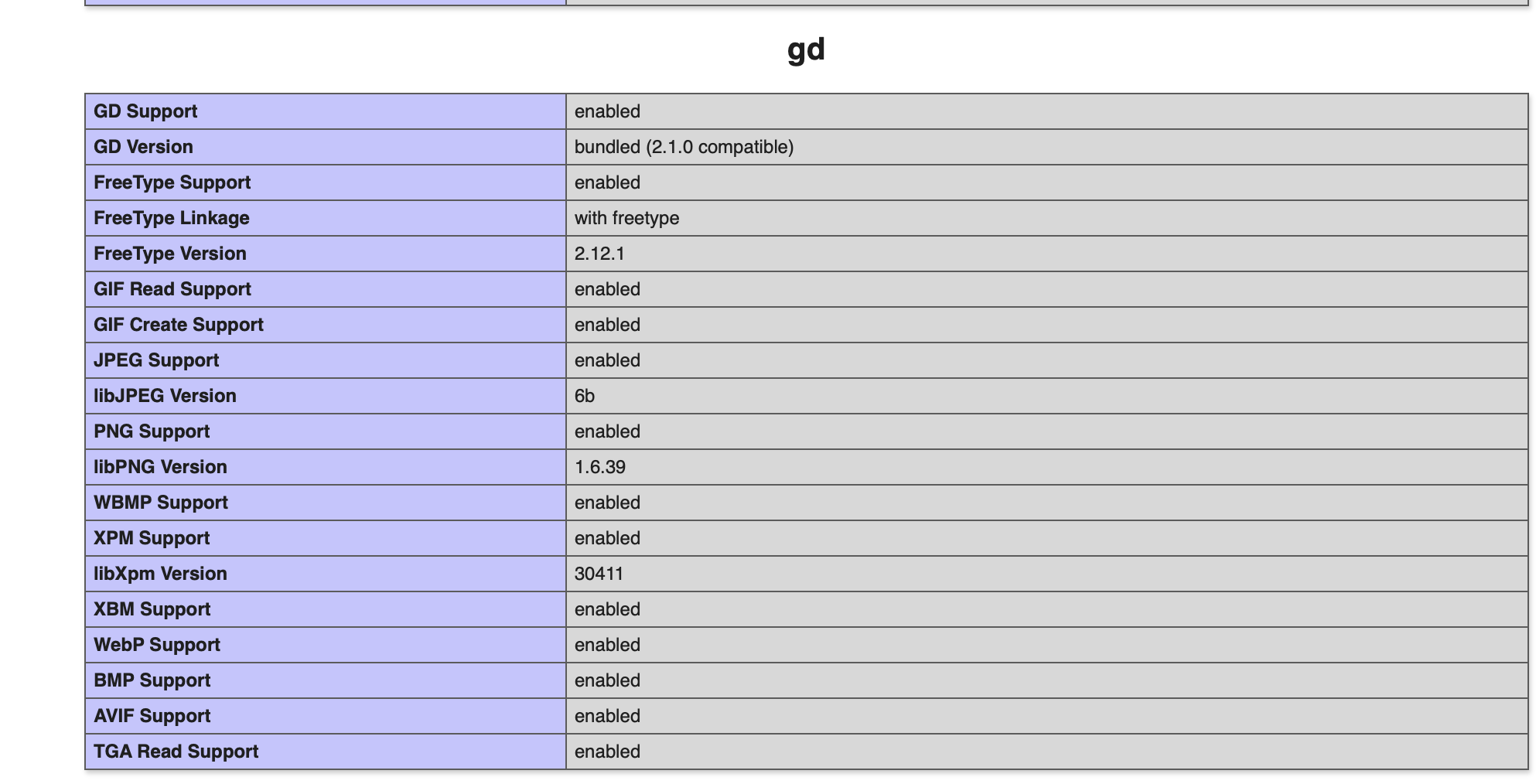

Some core php settings:

I know that I can set the thumb driver in the config, but that doesn’t seem to make a difference. I defined those settings in my config.php :
      'thumbs' => [
        'driver' => 'im',
        'srcsets' => [
            'default' => [
              // width values come from tailwind (640, 768, 1024, 1280, 1440 – 1440 is modified though, check main.css)
              '640w' => ['width' => 640, 'quality' => 50, 'format' => 'jpeg'],   // sm
              '768w' => ['width' => 900, 'quality' => 50, 'format' => 'jpeg'],   // md
              '1024w' => ['width' => 1200, 'quality' => 50, 'format' => 'jpeg'], // lg
              '1280w' => ['width' => 1500, 'quality' => 50, 'format' => 'jpeg'], // xl
              '1440w' => ['width' => 2560, 'quality' => 50, 'format' => 'jpeg'], // 2xl (adjusted to 1440px)
            ],
            'stage' => [
              '640w' => ['width' => 640, 'quality' => 50, 'format' => 'jpeg'],   // sm
              '768w' => ['width' => 900, 'quality' => 50, 'format' => 'jpeg'],   // md
              '1024w' => ['width' => 1200, 'quality' => 50, 'format' => 'jpeg'], // lg
              '1280w' => ['width' => 1500, 'quality' => 50, 'format' => 'jpeg'], // xl
              '1440w' => ['width' => 2560, 'quality' => 50, 'format' => 'jpeg'], // 2xl (adjusted to 1440px)
            ],
            'stagehalf' => [
              '640w' => ['width' => 1024, 'quality' => 50],   // sm
              '768w' => ['width' => 1280, 'quality' => 50],   // md
              '1024w' => ['width' => 1280, 'quality' => 50], // lg
              '1280w' => ['width' => 1280, 'quality' => 50], // xl
              '1440w' => ['width' => 1280, 'quality' => 50], // 2xl (adjusted to 1440px)
            ],
            'columnimage' => [
              '640w' => ['width' => 640, 'quality' => 50, 'format' => 'jpeg'],   // sm
              '768w' => ['width' => 980, 'quality' => 50, 'format' => 'jpeg'],   // md
              '1024w' => ['width' => 640, 'quality' => 50, 'format' => 'jpeg'], // lg
              '1280w' => ['width' => 640, 'quality' => 50, 'format' => 'jpeg'], // xl
              '1440w' => ['width' => 1024, 'quality' => 50, 'format' => 'jpeg'], // 2xl (adjusted to 1440px)
            ],
        ]
      ],
If anyone has any advice, I would be very grateful. 
All the best!


