Does it work if you upload the MP3s one by one?
Yes it does. If i upload the file, then replace it, the previously generated cover image file does not get over written, i can see that from the created & modified time stamp on the file.
I did have an idea to store up the information in a file cache, then i can check the identical values and dump all the info and images in one hit instead of churning on each file. But i cant see a reliable way to trigger that, since there isnt a hook for an upload complete, only file.create which is per file, rather than per multi-upload complete.
Ah, then it’s because of the low-level file operations. If multiple files are created in the same request, Kirby won’t know about them until the next request.
Try this (again untested):
// image file
$audioartfilename = substr($this->filename(), 0, -4) . '-art.jpg';
$audioart = explode(',', $this->id3('cover'));
$audioartdecode = base64_decode($audioart[1]);

// Check if the same cover already exists
$hash = sha1($audioartdecode);
if ($image = $this->parent()->images()->findBy('gilmour_hash', $hash)) {
    return $image->filename();
}

// Does not already exist, create it

// Create as temporary file
$file = tmpfile();
fwrite($file, $audioartdecode);

// Move file to final destination and write meta file
$this->parent()->createFile([
    'source'   => stream_get_meta_data($file)['uri'],
    'filename' => $audioartfilename,
    'template' => option('hashandsalt.gilmour.imagetemplate'),
    'content'  => [
        'gilmour_hash' => $hash
    ]
]);

// Remove temporary file
fclose($file);

return $audioartfilename;
Thanks @lukasbestle - I thought we were on it there, but no. It seemed to work when i was uploading less then say 5 files at once, but if i do a whole album at once i get this now…
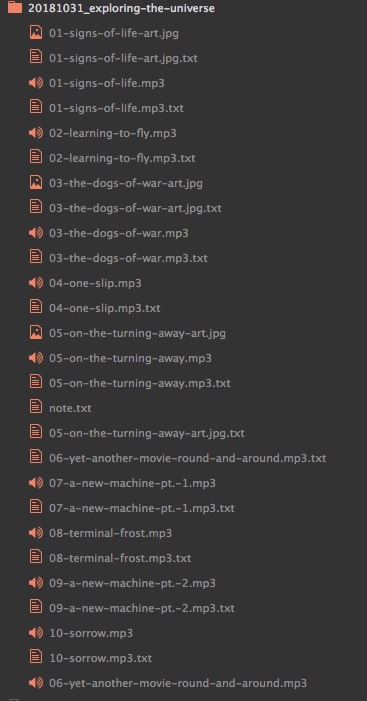
I uploaded 10 files, but ended up with 3 images. I guess its a speed thing, like somethings happening too fast to slow so its not seeing the file hash in time before deciding it needs to create the image.
All the meta files seemed to be stamped with the first image created though, so on the right road…
Are the hashes of those three images identical? If yes, is the behavior reproducible (= if you delete the files and upload the same album again, do you end up with the same three images or different ones)?
Yes all the images have exactly the same hash. And yes, if i delete all the files and upload all ten again, i get the exact same result. Ive tried several albums with 20+ tracks on them and i end up with 3 images each time. Those images are for the same three tracks, if I delete all the files and upload again. It doesn’t seem to be happening at random, its repeatable every time.
The odd thing is that it seems to be happening with roughly the 1st, 3rd, and 6th tracks on each album, which makes me think its a processing speed thing, as if past track 6 things are taking long enough for it to check the hash and move on.
Edit: I think i can see the reason for that… watching the progress bars on the upload, for some reason it seems to start the upload around track 4 ish, it doesn’t do them in alpha order. How does it decide the order to upload the files? Is it file size, smallest first?
That sounds like a race condition to me. Unfortunately there is no way to avoid this. 
Darn it. Thanks a million though, @lukasbestle for having a stab at it. I think i will try doing via the file cache, but I still need a hook or someway to know that the entire batch upload is complete, not just the individual files in the batch.
I have added an issue to the ideas repo for this.
An idea would be to use a button in the Panel to manually trigger cover image creation.
Sure, that’s an idea. I could probably do it via the Janitor plugin too.